Hashing for Those Who Never Read the RFC: MD5, SHA-1, SHA-256
Each algorithm, its historical flaws, and when it still makes sense to use — without the heavy math.
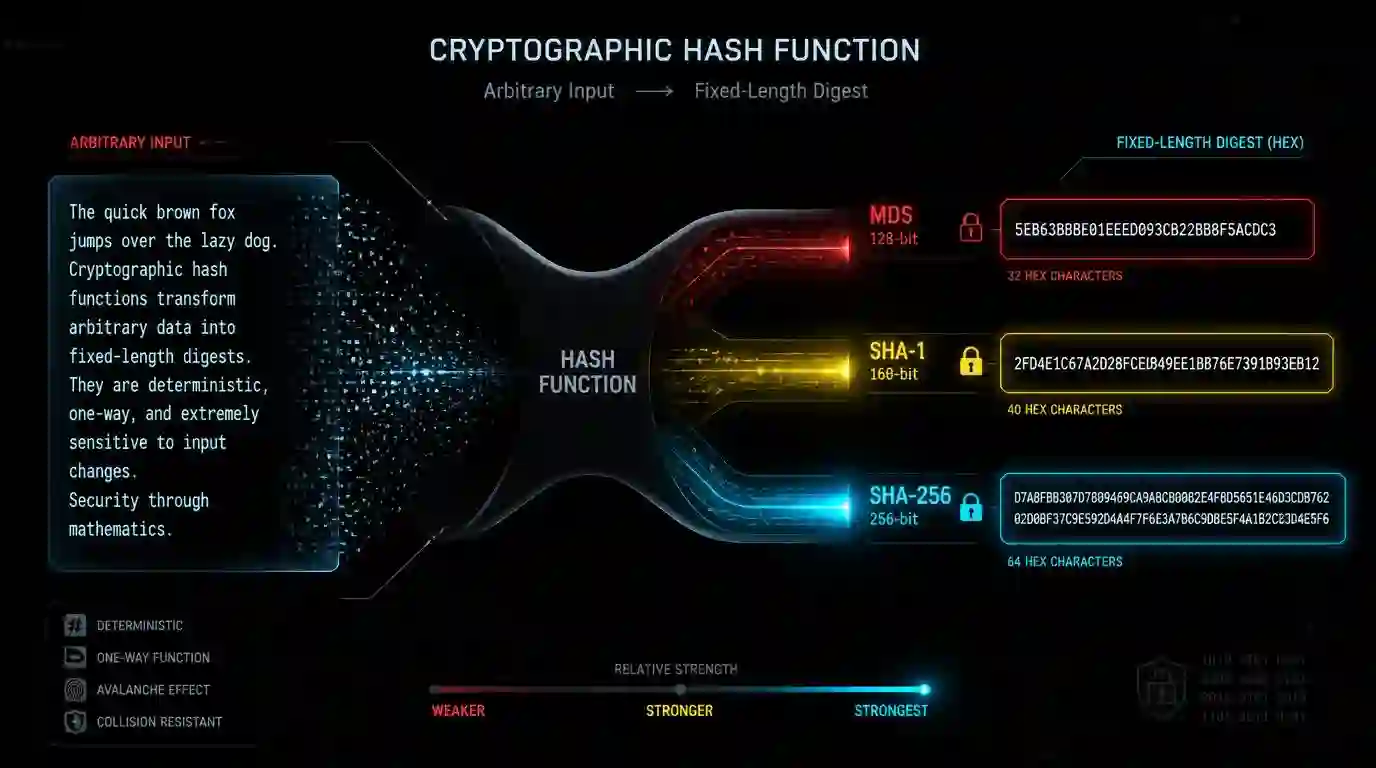
You downloaded an ISO image, opened the file's properties (or the download page), and there they are: three strings of letters and numbers labeled MD5, SHA-1, and SHA-256. Or, in a recent project, you found a users table with passwords stored as MD5 and a comment saying "it's encrypted." Either way the question is the same: what are these three, how do they differ, and which one should you use.
Short answer: they're hash functions of different sizes and ages. MD5 and SHA-1 are broken for security; SHA-256 is the current standard. And none of the three is fit for storing passwords.
| Algorithm | Output | Hex chars | Year | Security status | Use today |
|---|---|---|---|---|---|
| MD5 | 128 bits | 32 | 1992 | Broken (collisions since 2004) | Checksums against accidental corruption, deduplication |
| SHA-1 | 160 bits | 40 | 1995 | Broken (practical collision in 2017); NIST retires it by Dec 31, 2030 | Legacy, Git IDs |
| SHA-256 | 256 bits | 64 | 2001 | No known collision | Download checksums, TLS, signatures, HMAC |
What a hash is
A hash function takes any number of bytes and returns a fixed-size digest. Three properties matter:
- Deterministic: the same input always produces the same output.
- One-way: you can't go from the hash back to the original content.
- Collision-resistant: it should be infeasible to find two different inputs with the same hash.
Any tiny change to the input changes the whole hash. hello and hellO differ by one letter; their SHA-256 values have nothing in common:
hello  2cf24dba5fb0a30e26e83b2ac5b9e29e1b161e5c1fa7425e73043362938b9824
hellO  04a6f55face2f46be8c23f627d539827615851e10751b63ec59db6d2c706b770
Hashing isn't encryption. Encryption is reversible with the key; a hash has no key and no way back. If that distinction is still fuzzy, the post on symmetric vs asymmetric encryption separates the two. And the output usually comes as hex but can come as Base64; they're just two ways of writing the same bytes, as Base64 vs hex shows.
Why MD5, SHA-1, and SHA-256 show up next to a file (and how to check one)
When a site publishes the hash of a download, it's saying: "if the file you received has this SHA-256, it's byte-for-byte the one I published." That catches corrupted downloads and, if the hash comes from a trusted source (an official HTTPS page, a signed file), tampered ones too. Tools like 7-Zip add a checksum option to the Windows context menu, which is why so many people see those three labels in a file's properties.
To check, compute the hash on your machine and compare it with the published one. I ran every command below against a hello.txt file containing the word hello:
# Windows, PowerShell
Get-FileHash -Algorithm SHA256 .\hello.txt
# Hash : 2CF24DBA5FB0A30E26E83B2AC5B9E29E1B161E5C1FA7425E73043362938B9824

# Windows, Command Prompt
certutil -hashfile hello.txt SHA256
# Linux
sha256sum hello.txt
# 2cf24dba5fb0a30e26e83b2ac5b9e29e1b161e5c1fa7425e73043362938b9824  hello.txt

# macOS (also on Linux via Perl)
shasum -a 256 hello.txt

# OpenSSL, on any system
openssl dgst -sha256 hello.txt
PowerShell prints uppercase and the others lowercase; hex is case-insensitive, so the value is the same. Many projects publish a SHA256SUMS file with one line per file, and Linux checks it for you:
sha256sum -c SHA256SUMS
# hello.txt: OK
# after changing one byte of the file:
# hello.txt: FAILED
# sha256sum: WARNING: 1 computed checksum did NOT match
If a site offers MD5, SHA-1, and SHA-256, check the SHA-256. The other two catch accidental corruption but don't guarantee nobody crafted a file with the same hash. If you'd rather not open a terminal, the Hash Generator takes a file and computes MD5, SHA-1, SHA-256, and SHA-512 in the browser, without uploading the file anywhere. Paste the published hash next to it and compare.
MD5: fast, short, and broken
MD5 produces 128 bits (32 hex characters) and was published in 1992. In 2004 researchers showed practical collisions. In 2008 a team used MD5 collisions to forge a rogue certificate authority certificate that browsers would have trusted. In 2012 the Flame malware used the same technique to fake a Microsoft code signature.
echo -n "hello" | md5sum
# 5d41402abc4b2a76b9719d911017c592
Mind the -n: without it, echo appends a newline and the hash changes completely. It's the number one cause of "my hash doesn't match my colleague's."
Where MD5 is still acceptable: detecting accidental corruption, cache keys, file deduplication, ETags. In other words, contexts where nobody has an incentive to craft a collision. For anything an adversary can exploit, such as signatures, integrity checks against tampering, or certificates, no.
SHA-1: Git still uses it, and not for the reason you'd think
SHA-1 produces 160 bits (40 hex characters), was designed by the NSA, and was published in 1995. In 2017 Google and CWI Amsterdam published SHAttered, the first practical collision: two different PDFs with the same SHA-1. That same year, Chrome and Firefox stopped accepting TLS certificates signed with SHA-1. In December 2022, NIST announced it will phase out SHA-1 in all applications by December 31, 2030, in favor of SHA-2 and SHA-3.
What about Git? It uses SHA-1 to name every object (commit, tree, file), and that does matter for security: in an open project, anyone can send content through a pull request, binaries included, so the adversary controls the input. What protects Git today is that, since version 2.13 (2017), it uses a hardened SHA-1 implementation by default, SHA-1DC, which detects SHAttered-style collision patterns and rejects the object (Git documentation). The project itself calls this a stopgap: "SHA-1 is still weak."
The way out is SHA-256. Git has been able to create SHA-256 repositories since version 2.29, released in October 2020 and labeled experimental at the time:
git init --object-format=sha256 new-repo
git -C new-repo rev-parse --show-object-format
# sha256
The same content gets different IDs in each format. I tested with Git 2.55:
printf 'hello' | git hash-object --stdin   # SHA-1 repo
# b6fc4c620b67d95f953a5c1c1230aaab5db5a1b0
printf 'hello' | git hash-object --stdin   # SHA-256 repo
# 8aec4e4876f854f688d0ebfc8f37598f38e5fd6903cccc850ca36591175aeb60
The plan is for Git 3.0 to create new repositories with SHA-256 by default. As of November 2026 that hasn't happened: SHA-1 is still the default, and Git's breaking changes page says 3.0 has no planned release date and makes the switch conditional on the ecosystem (libraries, applications, and hosting services) being ready for SHA-256. Existing SHA-1 repositories keep working; there's no plan to deprecate the format.
SHA-256: today's standard
SHA-256 is part of the SHA-2 family, produces 256 bits (64 hex characters), and was published in 2001. There's no known collision. It's in TLS, code signing, the checksums of practically every Linux distribution, Bitcoin, and HMAC-SHA256, which is the HS256 algorithm in JWTs (the post on how JWT works shows where it fits).
The same result in four environments, all run here:
echo -n "hello" | sha256sum
echo -n "hello" | openssl dgst -sha256
node -e "console.log(require('crypto').createHash('sha256').update('hello').digest('hex'))"
python3 -c "import hashlib; print(hashlib.sha256(b'hello').hexdigest())"
# all: 2cf24dba5fb0a30e26e83b2ac5b9e29e1b161e5c1fa7425e73043362938b9824
In the browser, the Web Crypto API does the same:
const buf = await crypto.subtle.digest('SHA-256', new TextEncoder().encode('hello'));
const hex = [...new Uint8Array(buf)].map(b => b.toString(16).padStart(2, '0')).join('');
// 2cf24dba5fb0a30e26e83b2ac5b9e29e1b161e5c1fa7425e73043362938b9824
A detail that trips up plenty of integrations: a hash is over bytes, not text. The Portuguese word ação is 6 bytes in UTF-8 and 4 bytes in Latin-1. The hashes have nothing to do with each other:
ação (UTF-8)    0664077f33cc3ebbaa4bbdacac0eb70e740983080f01dce29929e73b7785a7ad
ação (Latin-1)  5021bb98b2f2a48f39f2be7c788c933cf82c274b387ba879f8fca8e188b88610
If two systems compute different hashes for the "same" string, check the encoding before the algorithm. The post on UTF-8 encoding problems covers the most common variants.
For passwords: none of the three
MD5, SHA-1, and SHA-256 are fast on purpose. For passwords, speed is a flaw: a GPU tests billions of candidates per second against a fast hash. Passwords need a slow, tunable algorithm with a salt. The current OWASP minimums (checked on November 9, 2026):
- Argon2id: 19 MiB of memory, 2 iterations, parallelism 1 (first choice).
- scrypt: N = 2^17 (128 MiB), r = 8, p = 1.
- bcrypt: cost 10 or more, for legacy systems.
- PBKDF2-HMAC-SHA256: 600,000 iterations, when FIPS compliance is required.
I won't repeat the how and why here: password hashing with bcrypt, scrypt, and Argon2 covers salt, pepper, parameters, and migration. To try a bcrypt cost in practice, there's the bcrypt Generator.
Frequently asked questions
What's the difference between MD5, SHA-1, and SHA-256?
Size and security. MD5 produces 128 bits, SHA-1 160, and SHA-256 256. MD5 and SHA-1 have known practical collisions, so they're unfit for anything an attacker can exploit. SHA-256 has no known collision and is the current standard for checksums, signatures, and HMAC.
Is MD5 secure?
Not for security. Two files with the same MD5 can be crafted quickly on an ordinary computer. It's still useful for detecting accidental corruption or as a cache key, where nobody gains anything by creating a collision.
How do I check a file's SHA-256 hash on Windows?
In PowerShell, Get-FileHash -Algorithm SHA256 path\to\file. In Command Prompt, certutil -hashfile file SHA256. Compare the result with the hash published by the official source; upper or lower case doesn't matter.
Is SHA-1 still used?
Yes, in legacy systems and in Git, which has used SHA-1 with collision detection (SHA-1DC) since version 2.13. NIST set the end of SHA-1 use for December 31, 2030, and Git plans to make SHA-256 the default for new repositories in Git 3.0, which has no release date yet.
When in doubt, SHA-256; for passwords, never a fast hash
To check a download, use the SHA-256 the site publishes and ignore the other two. For integrity, signatures, or HMAC in your code, SHA-256 is the default choice. MD5 is for caches and deduplication, SHA-1 only where legacy forces it. And if the problem is storing passwords, the answer isn't in this table: it's Argon2id or bcrypt, with OWASP's parameters.
- 01 CPU Cores vs. Threads: What Actually Changes in Practice Understand the difference between CPU cores and threads and what actually changes for performance, multitasking, gaming, and development.
- 02 MIT, Apache, and GPL Licenses: Practical Differences for Developers MIT, Apache 2.0, and GPL are not the same thing. Understand permissive vs copyleft, patent protection, and compatibility before shipping code to production.