JSON Schema in Practice: Validate Before Processing
JSON Schema doesn't validate whether JSON is well-formed — it validates whether it follows the contract you defined. How to implement input validation in Node.js and Python, and why additionalProperties: false matters.
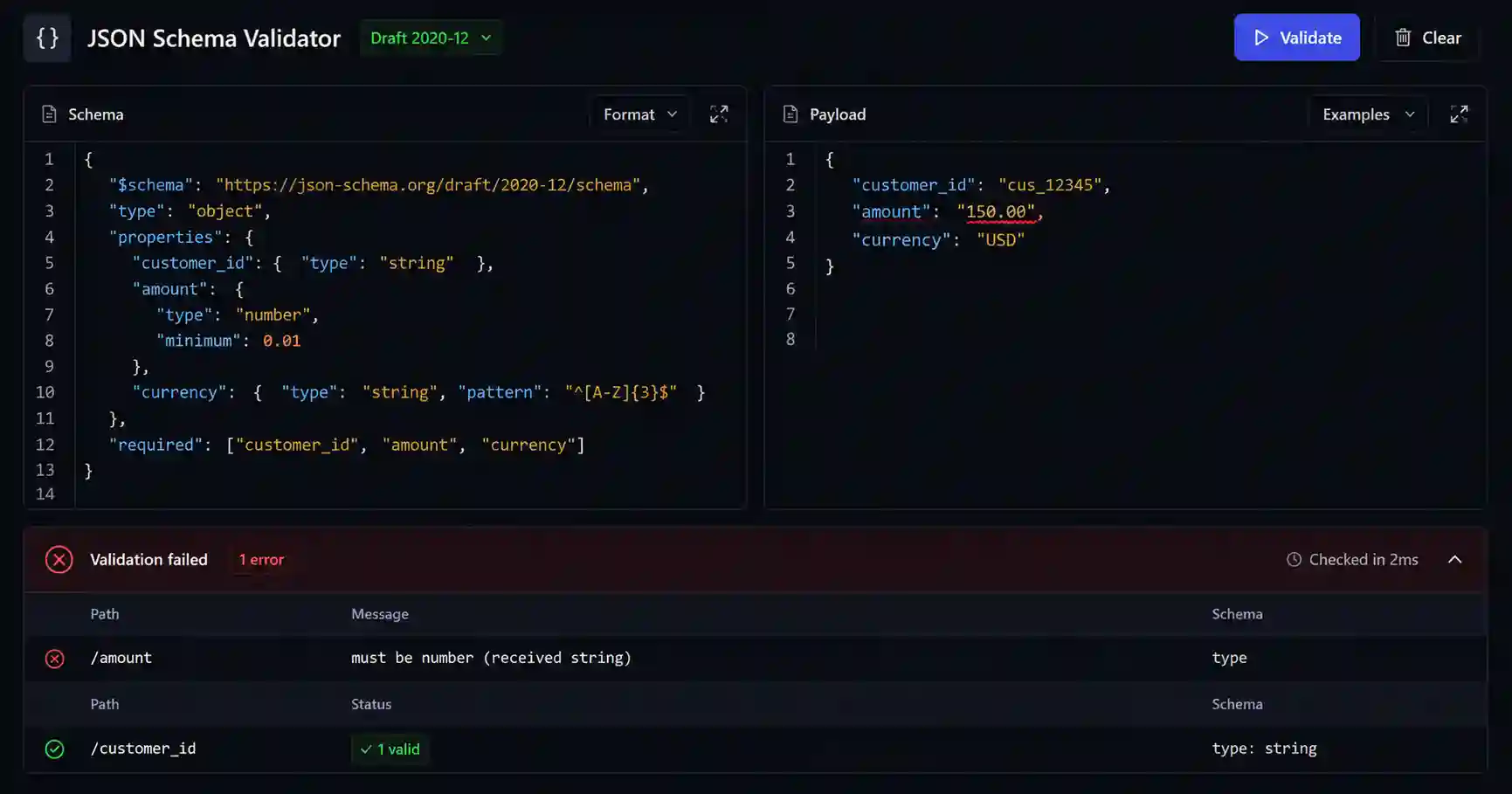
I got a production bug that took two hours to trace. An amount field arriving as the string "150.00" instead of a number: the database accepted it, the ORM didn't complain, and the discount calculation returned zero without a single error. The payload was syntactically valid JSON. The problem was structural, and nothing at the API's entrance checked the structure.
This post is the "how to do it in code": an annotated order schema, validation with Ajv in Node.js and with jsonschema in Python, what changes between draft-07 and 2020-12, and the configuration mistakes that make the validator accept what it should reject. If your problem is still JSON that doesn't even parse (Unexpected token), start with how to find and fix invalid JSON; if you want the concept before the code, read schema validation for JSON. Everything below was run with Ajv 8.20, ajv-formats 3.0.1, Node 24 and jsonschema 4.26 on Python 3.12.
What JSON Schema is, in one sentence
JSON Schema is a JSON document that describes what another JSON document must look like: which fields exist, of which type, which are required and which values are accepted. A validator takes the schema and the data and answers "valid" or a list of violations, each with the field's path. Parsing tells you whether the text is JSON; the schema tells you whether it's the JSON your API expects.
The keywords that show up in almost every API schema:
type:string,number,integer,boolean,array,objectornull. Without it, any value passes.properties: the schema for each field of the object.required: the keys that must exist. It demands the key, not the value; the details (whynullpasses) are in JSON Schema required.additionalProperties: whether undeclared fields are accepted. The default is to accept them.enum: a closed list of values.format:email,uuid,date-time. It depends on validator configuration, as you'll see below.minimum/maximum,minLength/maxLength,pattern,minItems: limits for numbers, strings and arrays.
The example schema: an order
{
  "$schema": "https://json-schema.org/draft/2020-12/schema",
  "$id": "https://api.example.com/schemas/create-order.json",
  "type": "object",
  "properties": {
    "customer_id": { "type": "string", "format": "uuid" },
    "amount_cents": { "type": "integer", "minimum": 1 },
    "currency": { "enum": ["USD", "EUR", "GBP"] },
    "items": {
      "type": "array",
      "minItems": 1,
      "items": {
        "type": "object",
        "properties": {
          "product_id": { "type": "string", "minLength": 1 },
          "quantity": { "type": "integer", "minimum": 1 }
        },
        "required": ["product_id", "quantity"],
        "additionalProperties": false
      }
    }
  },
  "required": ["customer_id", "amount_cents", "currency", "items"],
  "additionalProperties": false
}
Three decisions worth explaining. The amount is in integer cents (amount_cents), not a number with decimals: "multipleOf": 0.01 with floating point rejects legitimate values like 19.99, and the demonstration with numbers is in the complete JSON Schema example for a REST API. $schema points to 2020-12, the current dialect and the same one OpenAPI 3.1 uses. And additionalProperties: false appears at both levels, because nothing propagates from the root object into the array items.
Save it as order.schema.json. The examples below validate two payloads: a correct one and this one, with six problems:
{
  "customer_id": "123",
  "amount_cents": "150.00",
  "currency": "JPY",
  "items": [{ "quantity": 0 }],
  "admin": true
}
Validating JSON Schema in Node.js with Ajv
Ajv is the most widely used JSON Schema validator in the JavaScript ecosystem. It doesn't validate format on its own: that comes from the ajv-formats package.
npm i ajv ajv-formats
import Ajv2020 from "ajv/dist/2020.js";
import addFormats from "ajv-formats";
import schema from "./order.schema.json" with { type: "json" };

const ajv = new Ajv2020({ allErrors: true });
addFormats(ajv);

// compile ONCE, when the module loads
export const validateOrder = ajv.compile(schema);

export function createOrder(req, res) {
  if (!validateOrder(req.body)) {
    return res.status(400).json({
      error: "invalid_payload",
      details: validateOrder.errors.map((e) => ({ path: e.instancePath, message: e.message })),
    });
  }
  // from here on, req.body has the shape of the contract
}
Two details. The import is from ajv/dist/2020.js, not ajv: Ajv's default class understands draft-07, and a schema with a 2020-12 $schema compiled with it fails with no schema with key or ref "https://json-schema.org/draft/2020-12/schema". And allErrors: true makes Ajv keep going after the first error, so the client gets every problem at once. Real output for the bad payload:
/              must NOT have additional properties
/customer_id   must match format "uuid"
/amount_cents  must be integer
/currency      must be equal to one of the allowed values
/items/0       must have required property 'product_id'
/items/0/quantity  must be >= 1
The "150.00" from my bug now stops at the door with must be integer. Each of these messages, and what to do when it's the client sending numbers as strings, is covered in JSON Schema type errors.
What happens without ajv-formats
I tested it. In strict mode, Ajv v8's default, the schema doesn't even compile: unknown format "uuid" ignored in schema. With strict: false, it compiles with a console warning and "123" passes as a UUID. So the danger isn't forgetting the package; it's someone "fixing" the error by turning strict mode off.
Compile once, validate many times
ajv.compile() generates JavaScript code from the schema; that's the expensive part. I measured it on my machine with this schema: compiling on every call cost about 6 ms per request, versus under 1 microsecond for the already-compiled function. The Ajv documentation recommends compiling once and reusing the function, and there's a second reason besides performance: since the schema has an $id, compiling a copy of it again on the same instance throws schema with key or id "https://api.example.com/schemas/create-order.json" already exists. Compile at module load and export the function.
Validating JSON Schema in Python with jsonschema
pip install jsonschema
import json
from jsonschema import Draft202012Validator, FormatChecker

with open("order.schema.json", encoding="utf-8") as f:
    schema = json.load(f)

Draft202012Validator.check_schema(schema)  # fail early if the schema itself is wrong
validator = Draft202012Validator(schema, format_checker=FormatChecker())

def validate_order(payload: dict) -> list[dict]:
    return [
        {"path": e.json_path, "message": e.message}
        for e in sorted(validator.iter_errors(payload), key=lambda e: e.json_path)
    ]
iter_errors returns every error, like Ajv's allErrors, and the validator is created once, outside the function. check_schema catches errors in the schema itself (a keyword with the wrong type, for instance) at application startup instead of on the first request. Output for the bad payload:
$                    Additional properties are not allowed ('admin' was unexpected)
$.amount_cents       '150.00' is not of type 'integer'
$.currency           'JPY' is not one of ['USD', 'EUR', 'GBP']
$.customer_id        '123' is not a 'uuid'
$.items[0]           'product_id' is a required property
$.items[0].quantity  0 is less than the minimum of 1
The catch for anyone coming from Ajv: without format_checker, jsonschema ignores format. I ran the same validator without it and "123" passed as a UUID; the other five errors showed up normally. The documentation explains that, by default and per the specification, format is only an annotation. And some formats depend on optional packages: date-time needs rfc3339-validator, uri needs rfc3987. If the dependency isn't installed, validation of that format passes without error. To get them, install jsonschema[format] (or jsonschema[format-nongpl]). uuid and email need nothing extra.
Draft-07 or 2020-12: $schema must be exact
Plenty of tutorials (including the first version of this post) use "$schema": "https://json-schema.org/draft-07/schema#". The official draft-07 identifier is http://json-schema.org/draft-07/schema#, with http. In Ajv, the https version fails to compile with no schema with key or ref, because the validator looks up the meta-schema by that exact URI. The two correct identifiers:
- draft-07:
http://json-schema.org/draft-07/schema# - 2020-12:
https://json-schema.org/draft/2020-12/schema
Draft-07 is still well supported. For new projects I use 2020-12: it's the current version of the specification, it's the OpenAPI 3.1 dialect, and it brings $defs, dependentRequired and prefixItems. In Ajv that means Ajv2020; in Python, Draft202012Validator. If the same code has to accept schemas from different drafts, jsonschema.validators.validator_for(schema) picks the class from $schema.
additionalProperties: false, the keyword most often missing
By default, JSON Schema silently accepts extra fields. The "admin": true in the example payload would pass a schema without additionalProperties: false, and what happens next depends on your code: the field may be ignored or, with automatic mapping onto the database model, persisted. Declaring false on every object the API receives closes the contract: anything not in properties is rejected. When the API evolves, the new field goes into the schema first, instead of you finding out it was already arriving.
The exception is the consumer side. If you validate the response of a third-party API, false turns any new field from the provider into an error. Strict on what comes in, tolerant on what you consume.
What JSON Schema doesn't validate
JSON Schema handles shape. It doesn't handle:
- existence:
customer_idmay be a valid UUID and not exist in the database; - cross-field rules: that
amount_centsequals the sum of the items, or thatstart_datecomes beforeend_date; - authorization: who sent the payload, not what's inside it.
You can model conditions with if/then, but business rules written in a schema become a hard-to-read contract. The split that works: the schema validates shape at the edge, the code validates rules afterwards.
Frequently asked questions
How do I validate JSON against a JSON Schema?
With a validation library: Ajv in Node.js (npm i ajv ajv-formats) or jsonschema in Python (pip install jsonschema). You compile the schema once and call the validation function for each payload; it returns the list of errors with each field's path. For a quick test without code, an in-browser validator does the job.
Why does Ajv say "unknown format" when compiling?
Because the schema uses format and the ajv-formats package wasn't registered with addFormats(ajv). In strict mode, Ajv v8's default, that's a compile error. Don't turn strict off to "fix" it: with strict: false, the format stops being validated.
Does Python's jsonschema validate format?
Only if you pass a FormatChecker when creating the validator. Without it, format is ignored. Formats like date-time and uri also need optional dependencies, installed with pip install jsonschema[format].
Should I use draft-07 or 2020-12?
For new projects, 2020-12, the current version and the one OpenAPI 3.1 uses. Draft-07 is still supported; if you stay on it, use the $schema with http:// and the default Ajv class.
Validate at the edge, trust the interior
If the data passed the schema at the entrance, the rest of the code can assume the right shape, without if payload.get("amount") is not None scattered across handlers. But that only holds if the validator is actually validating: exact $schema, the right class for the draft, ajv-formats registered, FormatChecker passed and no hidden strict: false. The amount-as-string bug that opened this post would have stopped at the door with a clear message. Two hours of debugging that didn't need to happen.
The editorial content ends here. To iterate on the schema before taking it to code, pasting schema and payload and seeing each error's path, I use the Quick Tools JSON Schema validator; to get a batch of fake orders and see which ones the schema rejects, the JSON mock generator.
- 01 CPU Cores vs. Threads: What Actually Changes in Practice Understand the difference between CPU cores and threads and what actually changes for performance, multitasking, gaming, and development.
- 02 MIT, Apache, and GPL Licenses: Practical Differences for Developers MIT, Apache 2.0, and GPL are not the same thing. Understand permissive vs copyleft, patent protection, and compatibility before shipping code to production.