SATA or NVMe SSD for Programming: When It's Worth It
NVMe reads over 12x faster than SATA, but in builds and a developer's daily work the gain is much smaller. When the upgrade pays off, and when RAM is better.
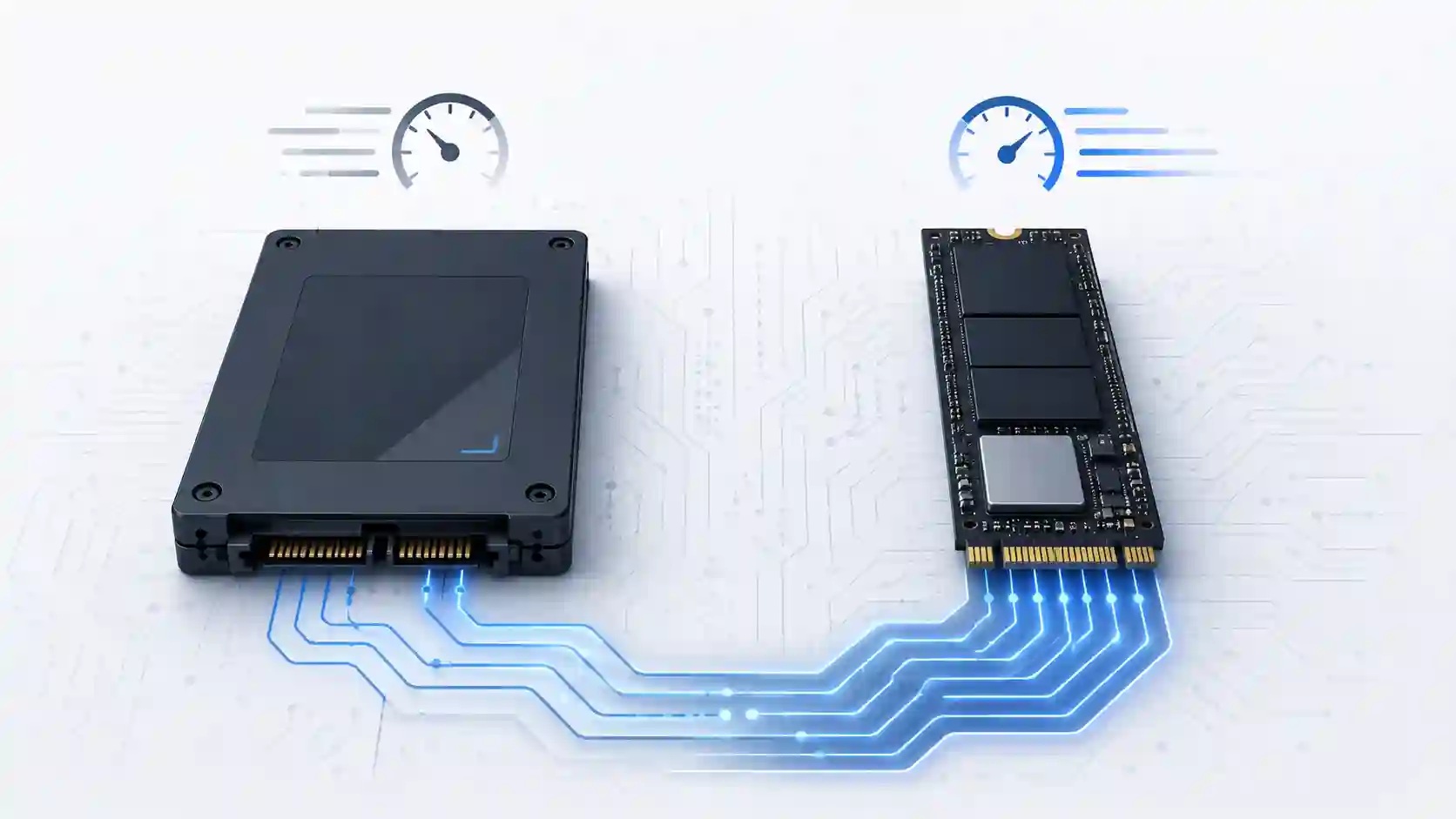
You swapped the hard drive for an SSD and the computer became a different machine. Now you're thinking about replacing the SATA SSD with an NVMe one and expecting another transformation. It might happen, or you might spend the money and notice nothing in daily use. The difference between the two is real, but the moment it matters for someone who writes code is far more specific than the numbers on the box suggest.
The summary, before the details:
| SATA SSD | NVMe SSD | |
|---|---|---|
| Interface | SATA III, 6 Gb/s | PCIe, usually 4 lanes (x4) |
| Protocol | AHCI, designed for hard drives | NVMe, designed for flash memory |
| Command queues | 1 queue, up to 32 commands | up to ~64K queues, up to ~64K commands each |
| Typical sequential read | ~550 MB/s | ~3,500 (Gen3), ~7,000 (Gen4), ~14,000+ MB/s (Gen5) |
| Form factors | 2.5" or M.2 (B+M key) | M.2 (M key), PCIe cards, U.2 |
| Heat | low | Gen4 and Gen5 may need a heatsink |
| Where it matters for devs | almost nothing day to day | large copies, swap, databases, heavy parallel I/O |
What separates SATA and NVMe
The difference starts at the interface. SATA III runs at 6 Gb/s with 8b/10b encoding, which gives a ceiling of 600 MB/s; in practice SATA SSDs top out around 550 MB/s in sequential reads. On top of it runs AHCI, the protocol designed for spinning hard drives. Intel's AHCI 1.3.1 specification defines one command list per port with at most 32 entries (the "command slots"), and Native Command Queuing also goes up to 32. In other words: one queue, 32 commands. For a hard drive with one read head, that was more than enough.
NVMe was designed for flash, directly on the PCIe bus. Instead of one queue, the protocol allows up to about 64K I/O queues, each with up to about 64K commands (the "1 queue, 32 commands" versus "64K queues, 64K commands per queue" comparison is in the NVMe overview presented at the 2013 OpenFabrics workshop). Nobody uses all of that; the point is that each CPU core can have its own queue and talk to the SSD without fighting the others for a lock, and the SSD gets enough parallel work to keep all of its flash chips busy at once.
Sequential speeds follow the PCIe generation. Doing the math with each generation's transfer rate and 128b/130b encoding, four lanes give about 3.9 GB/s on Gen3, 7.9 GB/s on Gen4 and 15.8 GB/s on Gen5. Drives get close: good Gen3 drives sit around 3,500 MB/s, Gen4 around 7,000 MB/s, and the Samsung 9100 PRO, a Gen5 drive, is rated at up to 14,800 MB/s in the 4 and 8 TB versions. On paper, that's more than 25 times SATA. In your daily routine, a different story.
How much disk a build really uses
Storage speed only shows up when storage is the bottleneck. To measure that instead of guessing, I compiled Redis 7.2.5 (about 1,600 source files, including the jemalloc, Lua and hiredis dependencies) in a Debian container, clearing the kernel page cache before each build (echo 3 > /proc/sys/vm/drop_caches) and reading the pgpgin and pgpgout counters from /proc/vmstat:
cold build 20.08s  read_MB=93  written_MB=336
cold build 19.98s  read_MB=95  written_MB=336
In 20 seconds of build, the disk delivered about 94 MB of reads (source code, compiler, libraries) and took 336 MB of writes (objects and binaries). Even at SATA's ceiling, that's under a second of reading, and writes land in the RAM cache first and get flushed in the background. Across three rounds, the cold-cache build and the build with everything already in memory stayed within 6% of each other (21.1 to 23.1 seconds cold, 20.6 to 21.7 warm, in a separate timing-only batch).
The limits of this test, so you don't over-generalize: I ran it on a laptop with an Intel Core Ultra 7 255HX and an NVMe SSD, inside the Docker Desktop VM (WSL 2), and I had no SATA SSD to compare directly. What the test shows is the I/O volume of a mid-sized C build: too small for the SSD to be the bottleneck. A giant monorepo, a Rust build with hundreds of crates or a huge C++ project read and write much more, and then it's worth repeating the measurement on your case. In most builds, the CPU is in charge; the post on CPU cores and threads explains why.
When NVMe makes a difference
Large copies and files. Moving tens of gigabytes, restoring a database dump, pulling and extracting heavy Docker images, cloning a repository with a huge history. Here sequential read and write show up directly on the clock.
Lots of small operations in parallel. A local PostgreSQL under a load test, several containers writing logs at once, an npm install in a large monorepo. This is where NVMe's queues and lower per-operation latency matter more than sequential speed.
Swap when RAM runs out. When memory overflows, the system starts using the disk as an extension of it. With NVMe, the slowdown is less painful than with SATA, but it's still a slowdown: the real problem is missing RAM, as the post on how RAM works shows.
Where SATA and NVMe tie: opening apps you've used recently, running the dev server (pnpm dev, flask run), editing code, browsing. The operating system keeps everything read recently in RAM, and the storage isn't even consulted.
Latency: the number that isn't on the box
Sequential speed is what manufacturers advertise. For databases and for a compiler opening hundreds of small files, what counts is the latency of each random read. Here NVMe wins by design: there's no SATA controller or AHCI in the path, and the command goes from the core's queue straight to the SSD. The order of magnitude is tens of microseconds per random read on SATA SSDs and somewhat less on NVMe, with the best NVMe drives below that; exact values vary a lot between models, so be wary of any single number.
A person in front of a screen can't tell 30 from 80 microseconds. A workload with thousands of operations per second can.
M.2 isn't NVMe: how to tell what you have
M.2 is a physical form factor, not a protocol. An M.2 slot can take a SATA SSD, an NVMe SSD or both, depending on the motherboard. Generally, an M.2 NVMe SSD has the M key (one notch in the connector) and an M.2 SATA SSD has B+M keys (two notches), but the final word is the board or laptop manual, which says what each slot supports. A SATA SSD in an M.2 slot works... at SATA speed.
To check what's already installed:
# Linux: the TRAN column shows sata or nvme
lsblk -d -o NAME,TRAN,ROTA,MODEL

# Linux, with the nvme-cli package installed
sudo nvme list
# Windows: BusType shows NVMe, SATA or SAS
Get-PhysicalDisk | Select-Object FriendlyName, BusType, MediaType, Size
On Windows, Device Manager also shows the model under "Disk drives"; with the model, the manufacturer's page tells you whether it's SATA or NVMe and which generation.
The practical decision for developers
Buying a new machine: NVMe is standard on practically every current laptop or desktop, and there's no reason to pick SATA in new hardware. If the question is which machine to buy, the post on how to choose a laptop for programming puts the SSD in the right order of priority.
Upgrading a SATA machine: find the bottleneck first. With less than 16 GB of RAM and Docker, a browser and an IDE open, more memory pays off far more than swapping the SSD. If RAM is already plentiful and the slowness shows up in large copies or local databases, NVMe is worth it, as long as the board has a compatible slot.
Typical web development (Node, Python, a few containers, editor, browser): SATA handles it. Storage is almost never the bottleneck for that workload.
Frequently asked questions
Does NVMe speed up compile times?
Barely, for most projects. In the Redis build I measured, the disk moved about 430 MB in 20 seconds, and the cold-cache build stayed within 6% of the build with everything in memory. Compilation is CPU-bound; storage only starts to show in very large projects. Measure yours before buying: if the warm-cache build is as slow as the cold one, the SSD isn't the problem.
Is it worth putting NVMe in a laptop that uses SATA today?
If the laptop has an M.2 slot that supports NVMe, it can be, especially if you do large copies or run databases locally. If it only has a 2.5" bay or a SATA-only M.2 slot, you can't: a good SATA SSD is the upgrade available. Before buying, check the manual and the price per gigabyte on the day, because the price gap between SATA and NVMe has swung quite a bit in recent years.
Do NVMe SSDs run hotter than SATA?
Yes. Gen4 and Gen5 drives under sustained load get hot enough to slow down (throttle) without proper cooling. Desktops solve it with an M.2 heatsink. In typical development use, which doesn't keep the SSD under continuous load for minutes, this rarely shows up.
How do I know if the SSD is the bottleneck?
On Linux, iostat -x 1 (sysstat package) shows the average queue size (aqu-sz) and wait times (r_await, w_await) per device. Don't rely on %util alone: the iostat manual itself warns that for devices serving requests in parallel, like modern SSDs, it doesn't reflect their real limits. If the disk sits idle most of the time, the bottleneck is elsewhere. When the problem is running out of space rather than speed, the path is investigating what filled the disk.
Measure first, then upgrade
NVMe beats SATA on practically every technical metric, from queues to latency. The question is whether your work uses that edge. For writing code, running a local server and a few containers, it almost never does: the build I measured moved a few hundred megabytes and was CPU-bound. The upgrade that changes how a machine feels is still going from a hard drive to any SSD. From SATA to NVMe, buy if the measurement shows a busy disk; if it shows RAM at the limit, the money goes to memory.
- 01 CPU Cores vs. Threads: What Actually Changes in Practice Understand the difference between CPU cores and threads and what actually changes for performance, multitasking, gaming, and development.
- 02 MIT, Apache, and GPL Licenses: Practical Differences for Developers MIT, Apache 2.0, and GPL are not the same thing. Understand permissive vs copyleft, patent protection, and compatibility before shipping code to production.